The Audit Log is the owner's record of every meaningful action on the wedding — every create, edit, delete, invite, and permission change. Like the Sharing page, it's owner-only: collaborators can't see it, so they can't cover their tracks.
What gets logged
Practically everything that changes data. The categories:
| Action | Examples |
|---|---|
| Create | New guest, new vendor, new payment, new task |
| Edit | Changed RSVP status, updated payment amount, renamed a category |
| Delete | Removed guest, deleted task, dissolved a group |
| Bulk | CSV import, bulk delete, generate-all RSVP links |
| Sharing | Invite sent, accepted, declined, deactivated |
| Settings | Wedding date changed, currency changed, sync toggled |
Pure reads (opening a page, viewing the dashboard) are not logged. The log is about changes, not visits.
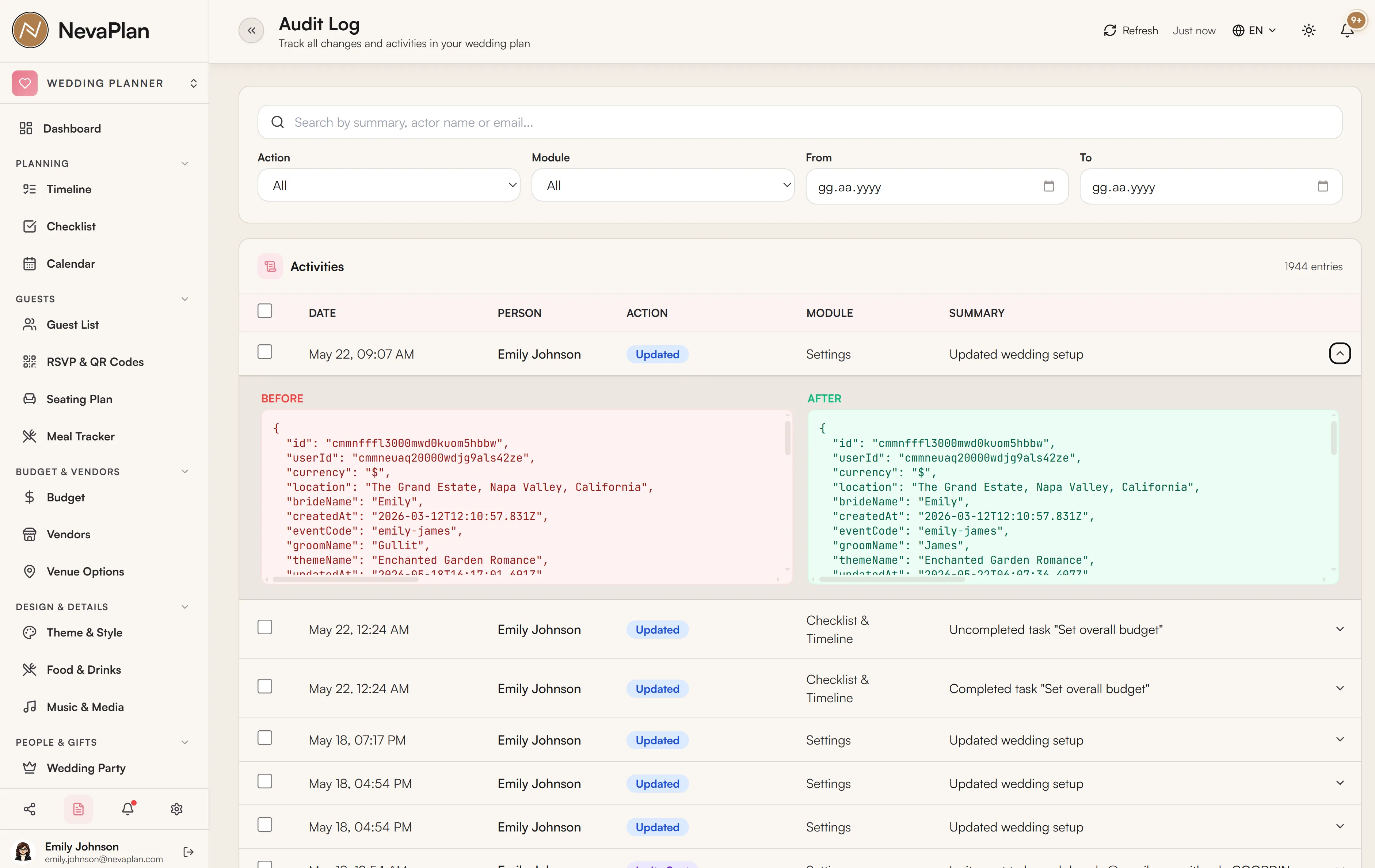
What each entry shows
Every entry has six pieces of information:
- Timestamp — when the action happened (in your time zone)
- User — who did it (you, your partner's name, the wedding planner)
- Action —
CREATE/UPDATE/DELETE/BULK_* - Module — which area of the wedding (GUESTS, BUDGET, TIMELINE, etc.)
- Target — the specific record (e.g. "Guest: Sarah Johnson", "Payment: Venue deposit")
- Diff — for updates, the before-and-after values of the changed fields
Filtering
For a busy wedding, the log can have thousands of entries. Five filters:
- User — see everything one person did
- Module — see everything in Budget, or in Guests
- Action — only deletes, or only bulk operations
- Date range — last 24 hours, last 7 days, last month, or custom
- Search — match the target name (e.g. "Sarah" finds entries touching Sarah Johnson's record)
A combined filter like "user=Wedding Planner, action=DELETE, last 7 days" answers a very specific question — what did the planner remove this week? — in seconds.
Common reasons to check the log
The audit log is rarely the first place you go, but it's the answer for:
- "Where did the data go?" — a row you remember is missing; the log shows who deleted it and when
- "Who set the wedding date back a week?" — settings changes are logged with old and new values
- "How did the budget get over-allocated?" — find the update that pushed it over
- "Did the invite go to John?" — sharing actions appear in the log too
- "What happened during the CSV import?" — bulk operations include the file name and the row count
Before a major bulk operation (CSV guest import, bulk delete), make a mental note of the timestamp. If something feels off afterward, the log's date filter gets you there in two clicks.
What's not in the log
A few things deliberately don't appear:
- Page visits / reads — too noisy, no value
- Login events — those are in account-level security, not the wedding log
- Notification deliveries — whether an email was opened is on the RSVP/email page, not here
- Photo uploads from guests — photo activity is in the photo-sharing module's own activity panel
Retention
Audit log entries are kept for the lifetime of your account. Even after the wedding, you can come back and see what happened during planning. There's no automatic pruning. If you want to delete the log entirely (e.g. you're closing the account), reach out to support — it's not user-deletable for security reasons.
The log is append-only. You can't edit or delete individual entries — that's the whole point. If something looks wrong in the log itself (the user shown is wrong, the diff doesn't match), it's a system issue, not a data-correction issue; flag it to support.
Sharing implications
The log makes a few things possible that the rest of the app intentionally doesn't:
- Accountability — knowing that every change is recorded usually keeps casual mistakes lower
- Recovery aid — if you accidentally bulk-deleted, the log doesn't restore the data but it tells you exactly which records were touched, so manual recovery is feasible
- Settling disagreements — when planning gets heated, the log's neutral record can defuse "but I told you not to" arguments
Next steps
If you find unexpected entries:
- Review the user's permissions in Sharing — narrowing access prevents future surprises
- Set up notifications for critical events — being told in real time beats finding out a week later
FAQ
No. The log records what happened but doesn't keep a copy of the data itself. If a guest was deleted, the log says "deleted, with name X, table Y, RSVP Z", but you'd need to re-add them by hand. For this reason, exporting your data periodically (especially before bulk operations) is the safest move.
Automated actions — auto-creating the Wedding Attire category from Theme items, auto-closing a collaborator's access after the wedding date, scheduled notifications — show as "system". They aren't tied to a person.
No. It's restricted to the owner. Even a collaborator with EDIT on every module can't open this page. If a collaborator suspects they're seeing odd behavior, they need to ask you to check.
No. Logging happens asynchronously after the main action commits, so writes don't wait on it. Reading the log uses indexed queries, so even thousands of entries paginate quickly.
Not directly per-event, but you can rely on the broader notification system — collaborator invites, RSVP responses, and other key actions trigger their own notifications. The audit log is the system of record; notifications are the proactive layer.