You're not planning the wedding alone. Your partner, your family, or your wedding planner can access the system too. The Sharing module lets you do this with fine-grained, per-module permissions. Only you (the owner) can access this page — collaborators can't even see it.
How the permission system works
Wedding Planner is made up of 8 separate modules, and you can grant access to each independently:
| Module | Pages it covers |
|---|---|
| CHECKLIST_TIMELINE | Timeline, Checklist, Calendar |
| GUEST_SEATING | Guest List, RSVP, Seating, Meal Tracker, Save the Date, Gifts, Thank You Cards |
| BUDGET_VENDORS | Budget, Vendors, Venue Options |
| THEME_DECOR | Theme & Style |
| FOOD_DRINKS | Food & Drinks |
| MEDIA_EXTRAS | Music & Media |
| HONEYMOON | Honeymoon |
| SETTINGS | Wedding Settings, Wedding Party, Contacts |
Three permission levels per module:
- NONE — the module is completely hidden from navigation; the collaborator isn't even aware it exists
- VIEW — can read only, can't change anything
- EDIT — can read and edit, add and delete
Inviting a collaborator
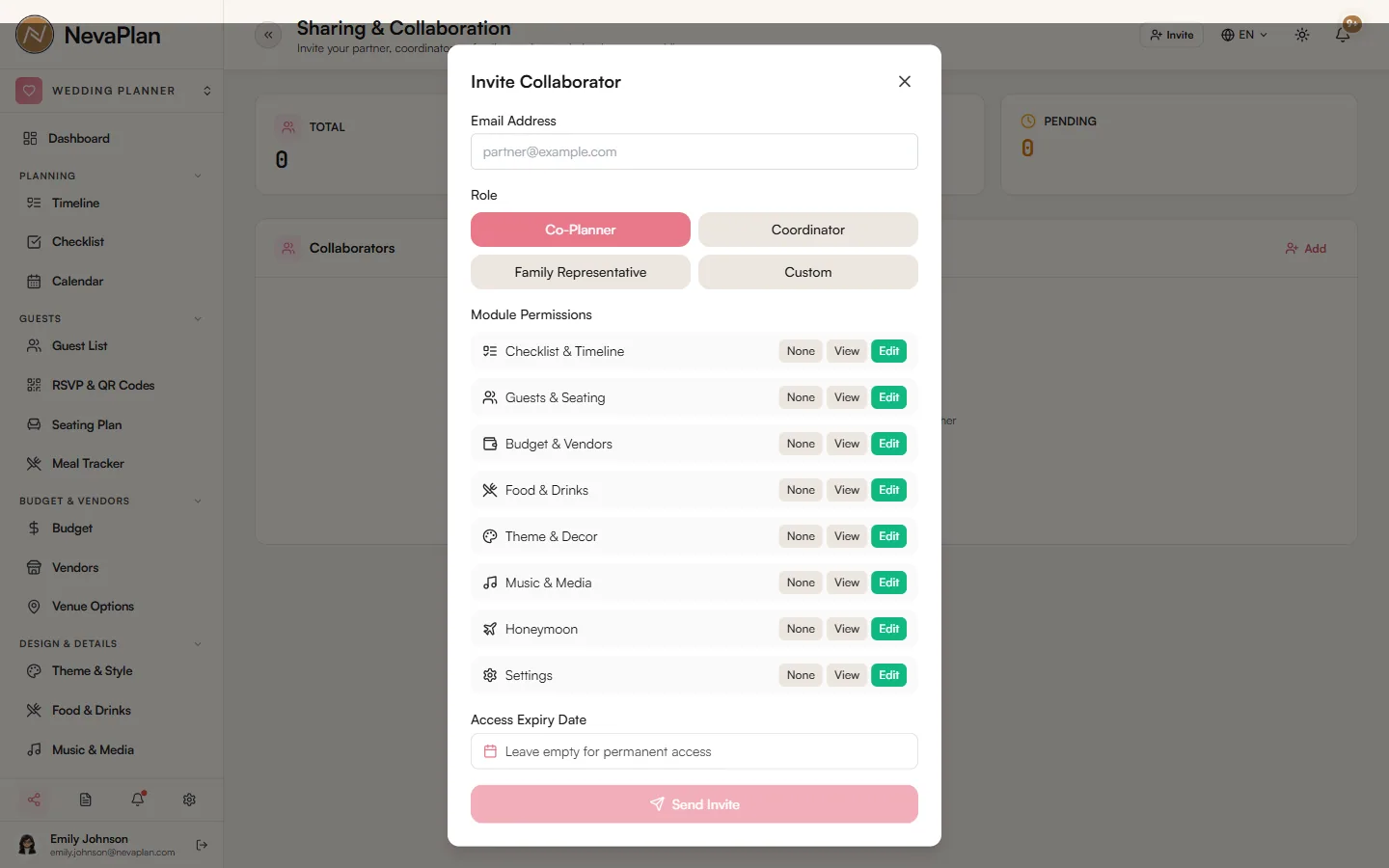
The Invite Collaborator button opens a panel. Fill in:
- Email — the email of the person to invite
- Role — Co-Planner, Coordinator, Family Representative, or Custom
- Permission Matrix — choose NONE/VIEW/EDIT for the 8 modules
The role is a label that helps you remember who someone is — it doesn't auto-assign permissions. You set the actual access in the permission matrix below it, regardless of role.
On save, an invite link is sent by email. The link is valid for 48 hours; if it's not accepted within that window, it's cancelled and you'll need to re-invite.
If the person doesn't have a NevaPlan account yet, opening the invite link first sends them to the sign-up page, then automatically links them to the wedding as a collaborator.
Quick permission suggestions
| Role | Recommended permissions |
|---|---|
| Co-Planner (your partner) | EDIT on all 8 modules |
| Coordinator (wedding planner) | EDIT on all 8, SETTINGS optional |
| Family Representative | GUEST_SEATING + FOOD_DRINKS EDIT, BUDGET_VENDORS VIEW, the rest NONE |
| Custom (informed close one) | VIEW on everything (can see but not change) |
You can change these later as needs evolve.
Managing existing collaborators
After an invite is accepted, the person becomes a list entry. What you can do on each row:
- Edit Permissions — update the permission matrix
- Set Expiration — a custom expiry date
- Deactivate — cut their access instantly (reversible)
Changes apply immediately — the collaborator doesn't need to refresh their browser. Thanks to the SSE connection, it reflects in real time.
Automatic expiration
If you don't explicitly set an expiresAt, the collaborator's access closes automatically at the end of wedding date + 1 day — so former collaborators don't keep access to your data after the wedding.
The owner has unlimited access to their own wedding; this auto-close rule applies only to collaborators.
Limit
You can add up to 10 active collaborators. Deactivated collaborators don't count toward this. If you try to add more, you'll get a WEDDING_MAX_COLLABORATORS error — you can deactivate one and add a new one.
If two people edit the same data at the same time, the last save wins. The system doesn't merge automatically, and it won't show a "currently editing" indicator. Coordinate with each other on important changes, or have one person edit critical data.
Pages closed to collaborators
There are two pages a collaborator can't see at any permission level:
- Sharing — that is, this page; owner only
- Audit Log — change records; owner only
This restriction is for security — a collaborator can't invite others or cover up their past changes. For details, see Reading the audit log.
Notification preferences are separate
A collaborator sets their own notification preferences — these are independent of the owner's. Even if you turn something off, if they have it on, notifications go to their channels. For details: Notification preferences.
FAQ
If the invite hasn't been accepted yet (within 48 hours), click Cancel Invite on the relevant row. For accepted invites, use Deactivate to cut access instantly. You can re-activate later if you want.
Yes. A user can be a collaborator on more than one wedding — invited separately to different friends' weddings. They use the Wedding Switcher to choose which wedding they're in.
Yes. The Audit Log page shows all create/edit/delete actions with who, which module, and when. Owner only.
No. Sharing permissions only apply within the Wedding Planner module. For access to other NevaPlan modules, the user must have purchased that module themselves.
No, their access closes automatically at the end of wedding date + 1 day. If you want, you can extend it by clearing the expiresAt field or pushing it to a later date. The owner (you) keeps access at all times.