When something needs sorting on the wedding day, you don't want to be digging through your phone for the officiant's number. The Contact Info page is your wedding's address book — family, the wedding team, and a read-out of your vendors, all reachable in two taps.
How contacts are grouped
Contacts are organized by relationship into groups:
- Bride's Side — Mother, Father, Sister, Brother, grandparents, aunts, uncles, cousins, friends (of the bride)
- Groom's Side — the same relationships, of the groom
- Wedding Team — Officiant, Planner, Venue Coordinator, Day-of Coordinator, Seamstress, Hair Stylist, Makeup Artist, Calligrapher, Transportation
- Other — anyone who doesn't fit the above
Each group collapses and expands, so you can keep the directory tidy and jump to the section you need.
Adding a contact
Press Add Contact. The form is short on purpose:
| Field | Required | Note |
|---|---|---|
| Name | Yes | The person's name |
| Relationship | Yes | Picked from the grouped list above |
| Phone 1 | No | Primary number |
| Phone 2 | No | A second number (work/partner) |
| No | Their email |
The relationship you pick determines which group the contact lands in. Family relationships carry an "of the Bride / of the Groom" sense, so "Mother" on the bride's side and "Mother" on the groom's side stay clearly separate.
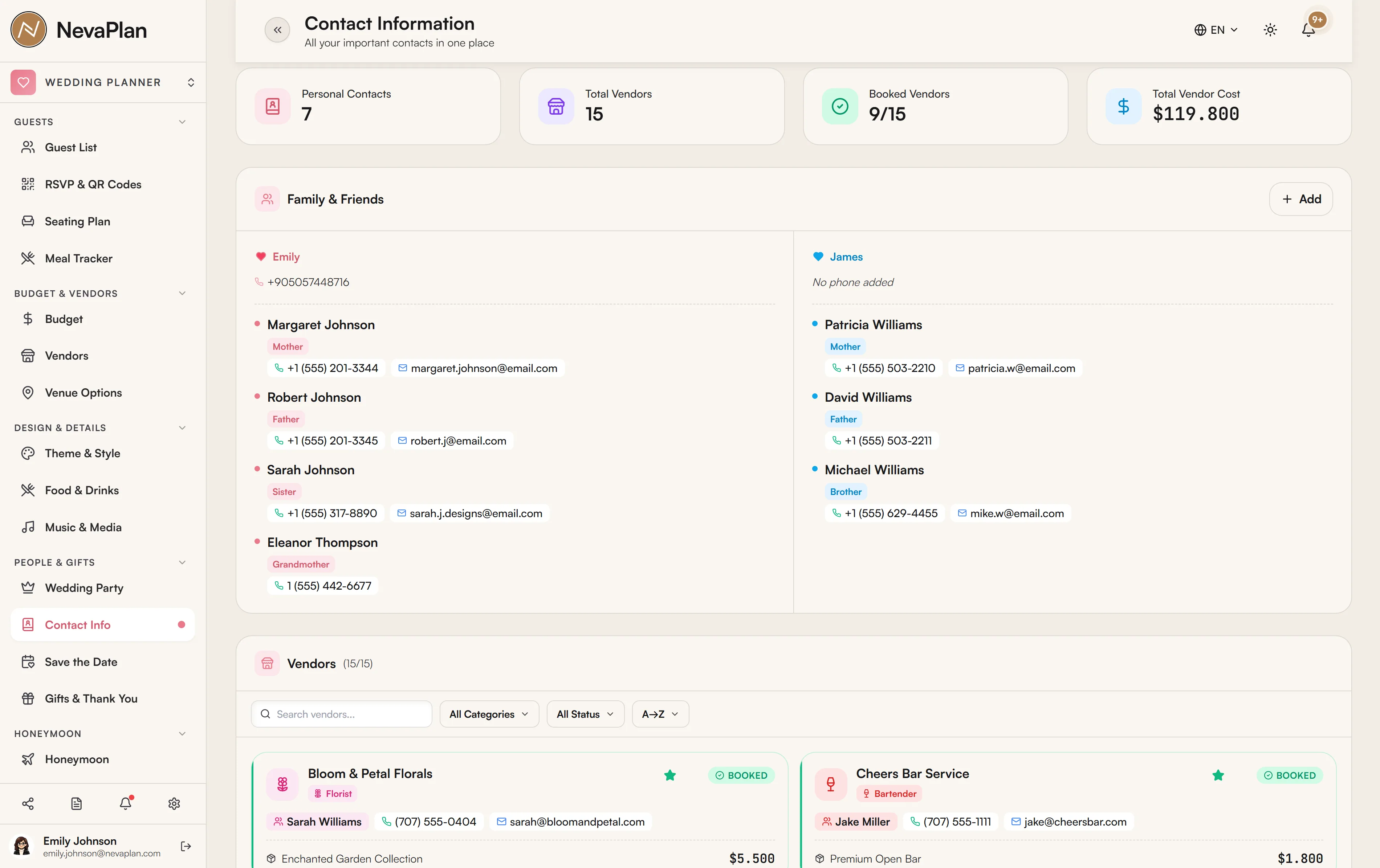
Phone numbers and emails are tap-to-call and tap-to-email, which is the whole point on a busy day — find the venue coordinator, tap, done.
Your vendors, at a glance
Below your personal contacts, the page shows a vendors summary — photographer, caterer, venue, DJ, florist, baker, and the rest — pulled from your Vendors list, each with their contact person, phone, and email. It's read-only here (you manage vendors on the Vendors page), but having them on the same screen as family means one directory covers everyone.
A week before the wedding, fill in the Wedding Team group completely — officiant, both coordinators, hair and makeup, transportation. These are the people you'll actually need to reach on the day, and it's the group most often left half-empty until it's too late.
Contacts vs vendors — what goes where
- Contacts (this page) = people in your life and the wedding team — family, friends, officiant, coordinators
- Vendors = the businesses you're paying — caterer, photographer, venue, florist — managed on the Vendors page and shown here read-only
Keep the two distinct: a vendor's contract and payments live in Vendors; a person's number lives in Contacts.
Next steps
- Add your wedding party's contact details here too, for the day-of group
- Make sure each vendor has a contact person so the vendor summary is useful
- Share with your coordinator so they have the directory on the day
FAQ
Relationships are chosen from the predefined grouped list (family roles, wedding-team roles, plus Other). If a contact doesn't fit a specific role, use Other so they still appear in the directory.
Convenience — the day-of directory is more useful when family and the people you're paying are on one screen. The vendor list here is read-only; to edit a vendor's contract, price, or contact, go to the Vendors page.
Yes — each contact has Phone 1 and Phone 2 (e.g. a coordinator's mobile and the venue's landline). Both are tap-to-call.
No — it's wedding-specific and lives in NevaPlan, so it's shareable with your partner and coordinator without handing over your whole phone book. There's no automatic sync with your device contacts.
If you invite them as a collaborator with access to the SETTINGS module under Sharing, yes — which is exactly what makes the directory worth keeping.