The honeymoon is the wedding's quiet companion — easy to leave until the last minute, then a scramble. The Honeymoon page gives it its own home: a budget, your bookings, a day-by-day plan, and a packing list, so the trip gets the same care as the day itself.
The sections
The page is organized into a few areas you move between:
- Overview — your trip dates, destination, and spending charts
- Expenses — what you're spending, by category
- Bookings — flights, hotels, activities, and their confirmation status
- Itinerary — a day-by-day plan
- Packing Checklist — categorized, check-off-as-you-go
Trip dates and overview
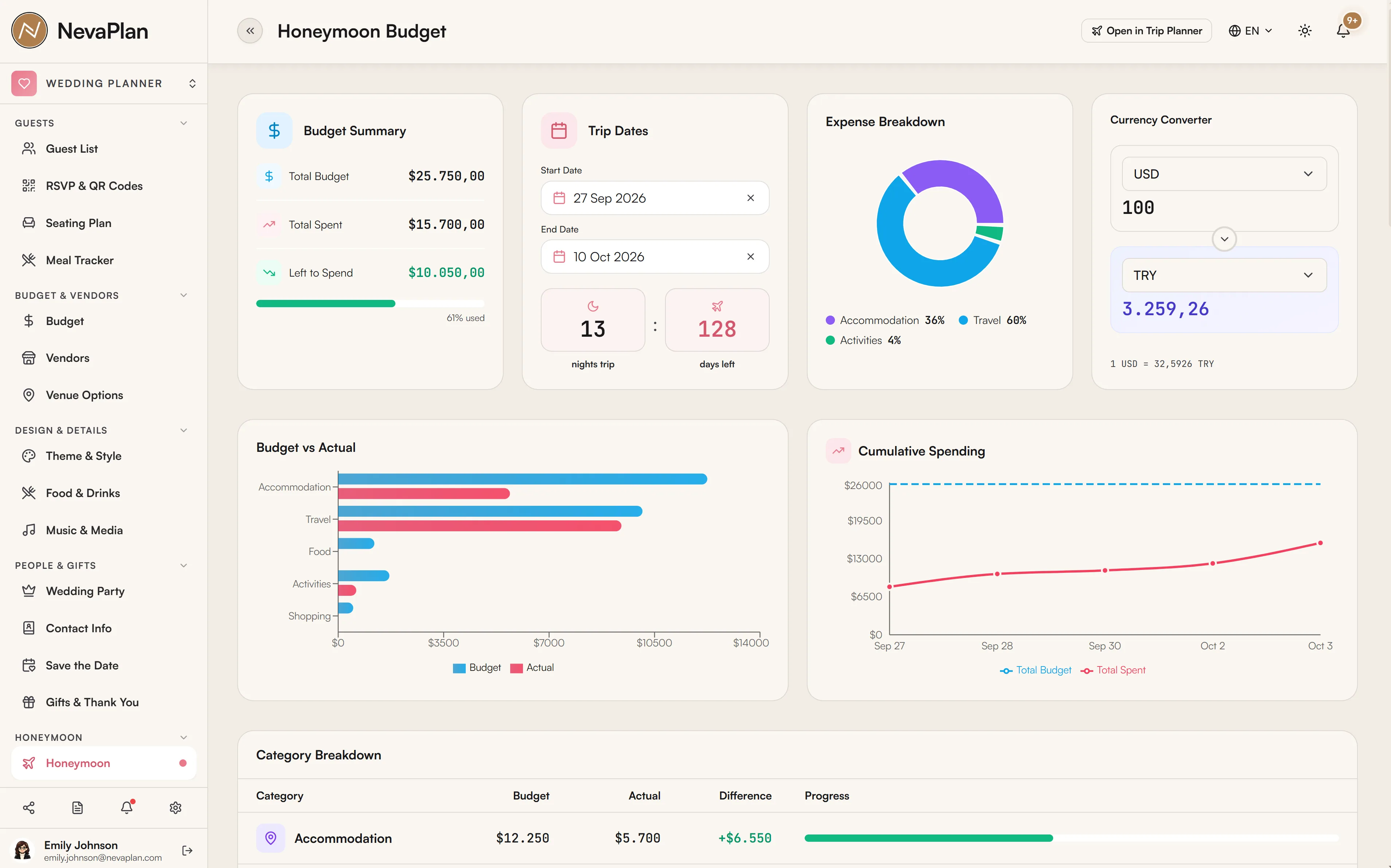
Set your Trip Dates (start and end) and destination at the top. The overview then shows spending visualizations — a breakdown of expenses by category, daily spend, and cumulative total — so you can see where the money is going as you plan.
Your trip dates are remembered on the device you set them on (stored in the browser), not synced to your account. If you plan on your laptop and then open the honeymoon page on your phone, you may need to set the dates again there. Your expenses, bookings, and itinerary items, however, are saved to your account normally.
Expenses
Record each cost with the Add Expense form:
| Field | Required | Note |
|---|---|---|
| Category | Yes | Accommodation, Travel, Food, Activities, Shopping, Other |
| Date | Yes | When the cost falls |
| Amount | Yes | The cost |
| Description | No | What it was |
| Vendor | No | Link to one of your wedding vendors |
The categories feed the overview charts, so a glance tells you whether accommodation or activities is eating the budget.
Bookings
Track everything you've reserved — flights, hotels, activities, transport, restaurants — each with a status:
- Pending (amber) — reserved or being arranged
- Confirmed (green) — locked in, confirmation in hand
- Cancelled (red) — fell through
Record the confirmation code, date and time, cost, and notes per booking. In the final week before you leave, filtering for anything still Pending is your "what still needs confirming?" list.
Itinerary
Build a day-by-day plan — add items with a date, time, location, and description (and a photo if you like). It turns "we'll figure it out there" into an actual flow, which matters most on shorter trips where wasted half-days hurt.
Packing checklist
A categorized checklist (Clothing, Toiletries, Documents, Electronics, and more) you tick off as you pack. Add your own items to any category. Starting it a week out beats the night-before panic — and Documents (passports, visas, booking printouts) is the category worth doing first.
How it connects to the rest
- Budget — the honeymoon has its own expense tracking here; your main wedding budget stays separate so the two don't muddle each other
- Dashboard — the Honeymoon Budget widget surfaces planned-vs-spent at a glance (you can hide it if you're not planning a honeymoon)
- Vendors — expenses and bookings can link to vendors you've already added
Next steps
- Add honeymoon booking deadlines to your timeline — flights and hotels get pricier the longer you wait
- Decide how the honeymoon fits your overall spend
FAQ
Trip dates are stored in your browser on the device where you set them, not on your account. Re-set them on each device you use. Everything else — expenses, bookings, itinerary, packing — is saved to your account and syncs normally.
No — it's tracked separately on this page so the honeymoon doesn't distort your wedding budget (or vice versa). The dashboard can show a Honeymoon Budget widget for a quick planned-vs-spent view, but the two budgets stay distinct.
You record the confirmation code, cost, date/time, and notes per booking, and itinerary items can take a photo. For full PDFs (e-tickets, vouchers), keep them in your email or a cloud drive and note the confirmation code here so you can find them fast.
The honeymoon planner is self-contained within Wedding Planner. If you also use the Trip Planner module, treat them as separate for now and copy details over manually — there's no automatic two-way sync between them.
Yes, if you've granted them access to the HONEYMOON module under Sharing. It's a separate permission, so you can share the honeymoon without opening up the rest of the wedding.